AI agent development: Everyone has AI now. Agents are next.
AI subscriptions were the right first step. The next step? Agents custom-built for your business: grounded in your data, tribal knowledge, and workflows.
Your answer builds the rest of this page.
Our recommended starting point
Give your data an AI front door.
The questions already exist.
Your people ask them every week. Dashboards get them close, but “close” often means “hours.”
So do the answers.
In your BI models, permissions included. People ask, agents do the grunt work. Searching. Assembling. Cross-checking.
Chat agents on your BI.
Easy, reliable access to facts is one of AI’s clearest, highest-ROI use cases. Your whole org will feel it.
Autonomous data agents.
Same data, nobody at the keyboard. Robots do the rounds, watch the numbers, and close the loop.
Agents everywhere else.
The rest of AI stops feeling abstract. You’ll see use cases everywhere, and you’ll be the one explaining why.
ChatStart here
Chat agents on your BI.
Easy, reliable access to facts is one of AI’s clearest, highest-ROI use cases. Your whole org will feel it.
Monitor
Autonomous data agents.
Same data, nobody at the keyboard. Robots do the rounds, watch the numbers, and close the loop.
Expand
Agents everywhere else.
The rest of AI stops feeling abstract. You’ll see use cases everywhere, and you’ll be the one explaining why.
AI Agents: The BI starting point
What it looks like.
Your people, in the AI they already use
The BI you already own
Want to see it working?
We built an accelerator for all of this, called Faucet. Your people ask in the AI they already use, get answers from the models you already trust, and build and share real reports from the same conversation. The Faucet page shows it end to end.
Or, if Faucet isn’t the right fit, we build you something custom on the same foundation.
Claude Partner Network
P3 Adaptive is Certified in the Claude Partner Network.
Our people hold Claude certifications, and we’re building from here.
The Claude Partner Network is how Anthropic works with the firms that put Claude into production for customers. The Services Track recognizes partners for building a certified delivery team, delivering Claude use cases for clients, and proving the work through public customer references. Partners advance through Certified, Select, Preferred, and Global Premier tiers.
Two weeks to a working data agent.
Give us two weeks to light you up. If we haven’t, there’s no invoice.
AI Agents: What we build
Agents, applications, and the part that makes them stick.
Services
Custom agents
An agent built around one real job in your business. It might answer questions from your data and documents, or move work between the systems you already run. It gets proven on that job before it scales.
We build them in
- Claude
- ChatGPT
- Microsoft 365 Copilot declarative agents
Services
Custom applications
The answer to a specific business problem used to be third-party software built for the average of a thousand companies. You bent your process to fit it and it still never quite worked, because building the one that actually matched you cost far too much to justify. AI changed that math. Now you can have the application your business actually wants.
Services
Agent rescue
Already have an agent nobody trusts? We find where it’s wrong and fix it. Most of the time the fault sits in the semantic model it reads rather than in the data itself, and semantic models are what we’ve always done.
Services
AI adoption
The hard part is not the rollout. It is the morning after, when everyone has the tool open and nobody has changed how they work.
We do both halves. The logistics, and the part almost nobody sells you – teaching your people what to hand an AI and what to keep, how to tell a good answer from a merely confident one, and what the job looks like once the slow part is gone.
We are not consultants who read about this. We run our own company this way, and we will tell you our preference and why rather than pretend to be neutral.
What that covers
- Which client, and why. Compared against how your people actually work, not against a feature grid.
- Licensing, rollout, security review. The unglamorous half that stalls most of these.
- Context they can retrieve. Your definitions and knowledge put in a shape the AI can actually use.
- Hands-on training. Working sessions with the people who will use it, on your real work.
- New habits that stick. What to delegate, what to check, and how a week is different afterwards.
AI Agents: How we build
You’ll be using it before we’re done building it.
Faucets first.
The agent your people will use gets built first. The plumbing behind it gets built only as the agent proves it needs it, so nothing you pay for sits idle waiting for a phase two.
Build in plain sight.
No requirements phase and no reveal at the end. You see it working within days, say what’s off, and it’s fixed by the next time you look. Say what would make it better and that usually gets in too.
Our happiness guarantee.
Two weeks to business impact that lights people up. Or walk away without cost.
AI Agents: What we build on
We grew up in Microsoft. You don’t have to.
Microsoft is a system we integrate with, not a condition. Whatever you’ve already standardized on, that’s where we start.
Anthropic, OpenAI, Google
We build on all three. Tell us the constraints you’re under and we’ll tell you which one we’d pick for the job, and why.
All in on Copilot?
Great, we’re ready there too. We build Microsoft 365 Copilot declarative agents inside your tenant, so nothing leaves it. More on Copilot agents.
Power BI, or your semantic layer
We love Power BI and have been shaping it since day one. If you’ve standardized on a different semantic layer, we know those too, and we’ve written converters that translate between them in every direction.
AI Agents: Who builds it
Not one kind of engineer. All of them.
Software engineers to data platform specialists
An agent is a software problem and a data problem at the same time, so the team that builds yours has both. The people who model your data work on it alongside the people who write the application, and every one of us lives and breathes AI in our own work, every day.
Our own AI platform. Ahead of the big vendors.
Faucet is an AI platform we built for ourselves when we could see where BI was headed and nobody was building it. It still does things the major vendors’ tools can’t, and we run our company on it.
Why this work matters
The models are everyone’s. The data is yours.
Work that gets smarter, not just faster
Everyone can buy the same models tomorrow, and they will. What nobody else can point them at is how your business actually works – your definitions, your exceptions, the twenty things everyone in the building knows and no vendor does. Aimed at that, AI starts answering the questions only your company can ask, as fast as your people can ask them.
The distance is compounding
Most AI pilots stall for the same reason: the AI never learns how your business works. MIT’s 2025 study of enterprise AI put the share of pilots with no measurable return at 95%, and cited that learning gap rather than the models. Closing it means handing the AI your business context and data in a form it can read. That takes real time, which is why the companies that started early are already a year ahead. It’s also the half we’ve been doing since 2013, for 600+ organizations. See Power BI services.
The frame
Models are becoming, quite frankly, a commodity. There is lots and lots of models out there which are very, very capable. The question is, how do you marshal that capability?

Satya NadellaMicrosoft AI Tour, Mumbai, December 2025Portrait: Brian Smale / Microsoft, CC BY-SA 4.0
 Answers from Rob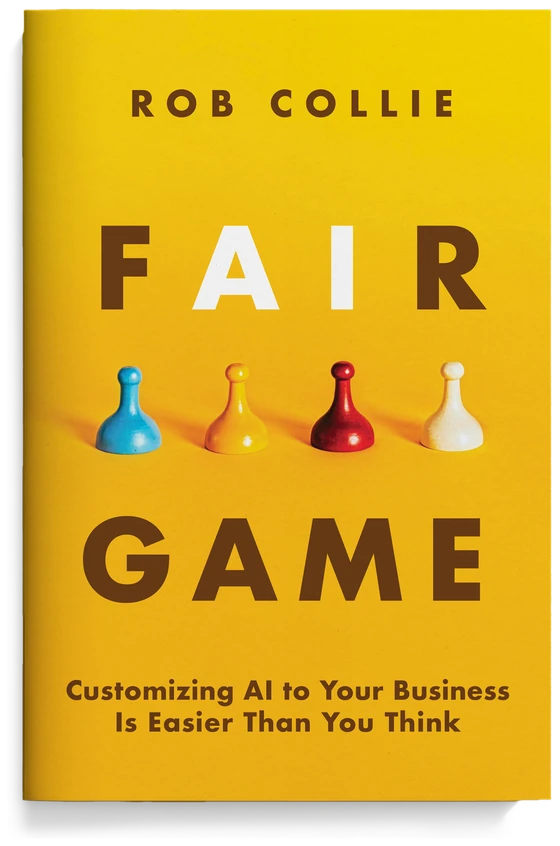
The book
AI doesn't have to feel like a mystery.
Rob wrote it when the AI noise started keeping him up at night and nothing he read was helping. The reframe: custom AI is more of a data-and-software problem than a mystery, and the gap between what AI can do with your data and what you have been told it takes is much smaller than the industry wants you to believe.
Claude Partner Network
P3 Adaptive is Certified in the Claude Partner Network.
Our people hold Claude certifications, and we’re building from here.
The Claude Partner Network is how Anthropic works with the firms that put Claude into production for customers. The Services Track recognizes partners for building a certified delivery team, delivering Claude use cases for clients, and proving the work through public customer references. Partners advance through Certified, Select, Preferred, and Global Premier tiers.
Bring us your hardest question.
Your white whale: you know there has to be a better way, and if you could crack it, your world would change. We thrive on those.